dnn_optical_flow
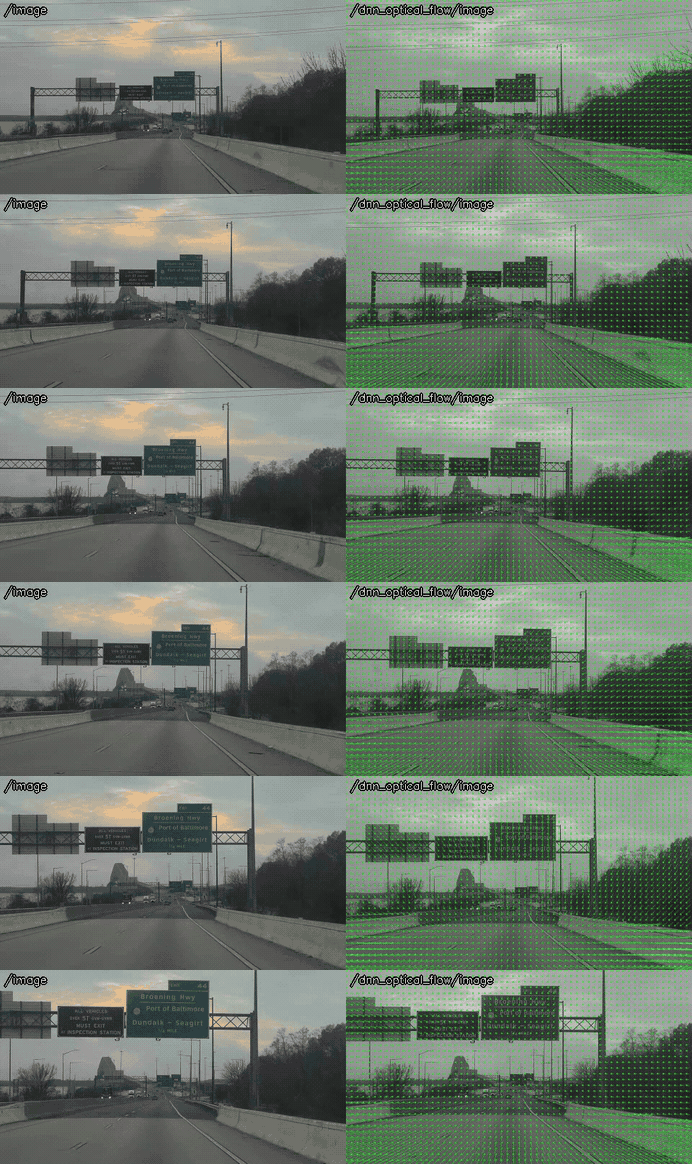
Dense optical flow with RAFT (DNN), the same outputs as fback_flow.
Dense optical flow between the consecutive images by RAFT of opencv_zoo (trained on Sintel, 360x480 input; the model is under the BSD-3-Clause license and its conversion to onnx by PINTO0309 under the MIT License), with the same outputs as fback_flow, so that it can replace fback_flow: ~/flows sampled on a grid of 16 pixels and ~/image of the flows drawn on the previous image. The model needs OpenCV 4.10 or later (OpenCV 4.6 cannot read it), and runs on the CPU with OpenCV 4.x, whose CUDA backend crashes with it: about 1.3 s per image with OpenCV 4.12 and 0.4 s with OpenCV 5.1 on a desktop CPU, so the flows are of the images which the node processes, not of all the images.
opencv_apps |
3.1.0 and later |
|---|---|
ROS |
lyrical and later; not ROS One (OpenCV 4.6), jazzy (OpenCV 4.6), kilted (OpenCV 4.6) |
OpenCV |
OpenCV 4.10 or later, which reads RAFT; on the CPU with OpenCV 4.x, whose CUDA backend crashes with RAFT |
Group |
Optical flow and motion, the nodes of which publish |
Usage
# ROS 2
ros2 launch opencv_apps dnn_optical_flow.launch.xml image:=/camera/image_raw debug_view:=false
# ROS 1
roslaunch opencv_apps dnn_optical_flow.launch image:=/camera/image_raw debug_view:=false
Try it with the demo video
Download the input video of the demo above, publish it as image with image_publisher, and run the node on it, in the terminals:
wget https://ros-perception.github.io/opencv_apps/media/clips/keybridge.mp4
# terminal 1: publish the video as image in a loop
ros2 run image_publisher image_publisher_node keybridge.mp4 --ros-args -p publish_rate:=10.0 -r image_raw:=image
# terminal 2: run the node
ros2 launch opencv_apps dnn_optical_flow.launch.xml image:=image
# terminal 3: view the result
ros2 run rqt_image_view rqt_image_view /dnn_optical_flow/image
Needs OpenCV 4.10 or later. RAFT takes about 1 s per image on a CPU (OpenCV 4.x runs it on the CPU), so the flows are of the images about 1 s apart, which the node processes, not of the consecutive images of the 10 Hz video. The model of opencv_zoo is under the BSD-3-Clause license (RAFT) and the MIT License (its conversion to onnx).
In ROS 1:
# terminal 1
rosrun image_publisher image_publisher keybridge.mp4 _publish_rate:=10 __name:=camera
# terminal 2
roslaunch opencv_apps dnn_optical_flow.launch image:=camera/image_raw
See Credits of the demo videos for the license of the video.
Subscribed topics
Topic |
Type |
|---|---|
|
|
Published topics
Topic |
Type |
|---|---|
|
|
|
|
Parameters
See also the common parameters.
Name |
Type |
Default (range) |
Changed at run time |
Description |
|---|---|---|---|---|
|
string |
“auto” |
yes |
Backend of cv::dnn: auto, cpu, opencl, opencl_fp16, cuda or cuda_fp16. auto uses CUDA when OpenCV is built with CUDA and a CUDA device is found, and the CPU otherwise. RAFT runs on the CPU instead of CUDA with OpenCV 4.x, which crashes |
|
int |
360 (1 - 4096) |
yes |
Height of the network input, 360 for RAFT of opencv_zoo |
|
int |
480 (1 - 4096) |
yes |
Width of the network input, 480 for RAFT of opencv_zoo |
|
string |
“” |
yes |
Path or URL of the RAFT model (onnx) of the inputs 0 and 1 (the previous and the current image) and the output of the flow, empty for RAFT of opencv_zoo (OpenCV 4.10 or later). The URL is downloaded to ~/.ros/opencv_apps/models/ at the first time |
|
int |
3 |
no, restart the node |
Specify queue_size of input image subscribers |
Source
src/nodelet/dnn_optical_flow_nodelet.cpp, launch/dnn_optical_flow.launch.xml