rgbd_odometry
The visual odometry of an RGB-D camera (cv::rgbd::RgbdOdometry, ICPOdometry and RgbdICPOdometry).
Visual odometry of an RGB-D camera by the odometry of the rgbd module of opencv_contrib: the motion of the camera between the consecutive images by the photometric error of the image (rgbd), the geometric error of the depth (icp) or both (rgbd_icp), accumulated into the pose of the robot (base_frame, by the TF of the camera on it) in odom_frame, published as nav_msgs/Odometry and the TF odom_frame -> base_frame, e.g. for slam_toolbox and Nav2.
opencv_apps |
3.1.0 and later |
|---|---|
ROS |
ROS One, jazzy, kilted, lyrical and later |
OpenCV |
the rgbd module of opencv_contrib (OpenCV 4) |
Group |
Odometry and maps, the nodes of which publish |
Usage
# ROS 2
ros2 launch opencv_apps rgbd_odometry.launch.xml image:=/camera/camera/color/image_raw depth:=/camera/camera/aligned_depth_to_color/image_raw camera_info:=/camera/camera/color/camera_info base_frame:=camera_link
# ROS 1
roslaunch opencv_apps rgbd_odometry.launch image:=/camera/color/image_raw depth:=/camera/aligned_depth_to_color/image_raw camera_info:=/camera/color/camera_info base_frame:=camera_link
The topics of the depth above are those of an Intel RealSense camera by realsense2_camera, with the depth aligned to the color image, which it does not publish by default: ros2 launch realsense2_camera rs_launch.py align_depth.enable:=true (ROS 2) or roslaunch realsense2_camera rs_camera.launch align_depth:=true (ROS 1). On ROS 2 the topics are in /camera/camera, as the default namespace (camera_namespace) and name (camera_name) of its node are both camera; with camera_namespace:=/ they are in /camera as on ROS 1. With another RGB-D camera, give its depth registered to the color image (of the pixels of the color image) and the camera_info of the color image.
Try it with the demo video
Download the input of the demo above, publish it, and run the node on it, in the terminals:
wget https://raw.githubusercontent.com/ros-perception/opencv_apps/indigo/test/publish_rgbd.py
wget https://raw.githubusercontent.com/ros-perception/opencv_apps/indigo/test/rgbd_xyz.mp4
wget https://raw.githubusercontent.com/ros-perception/opencv_apps/indigo/test/rgbd_xyz_depth.npz
# terminal 1: publish the input in a loop
python3 publish_rgbd.py rgbd_xyz.mp4 rgbd_xyz_depth.npz
# terminal 2: run the node
ros2 launch opencv_apps rgbd_odometry.launch.xml image:=image depth:=depth camera_info:=camera_info base_frame:=camera_link
# terminal 3: view the result
ros2 run rviz2 rviz2 -d $(ros2 pkg prefix --share opencv_apps)/rviz/rgbd_odometry.rviz
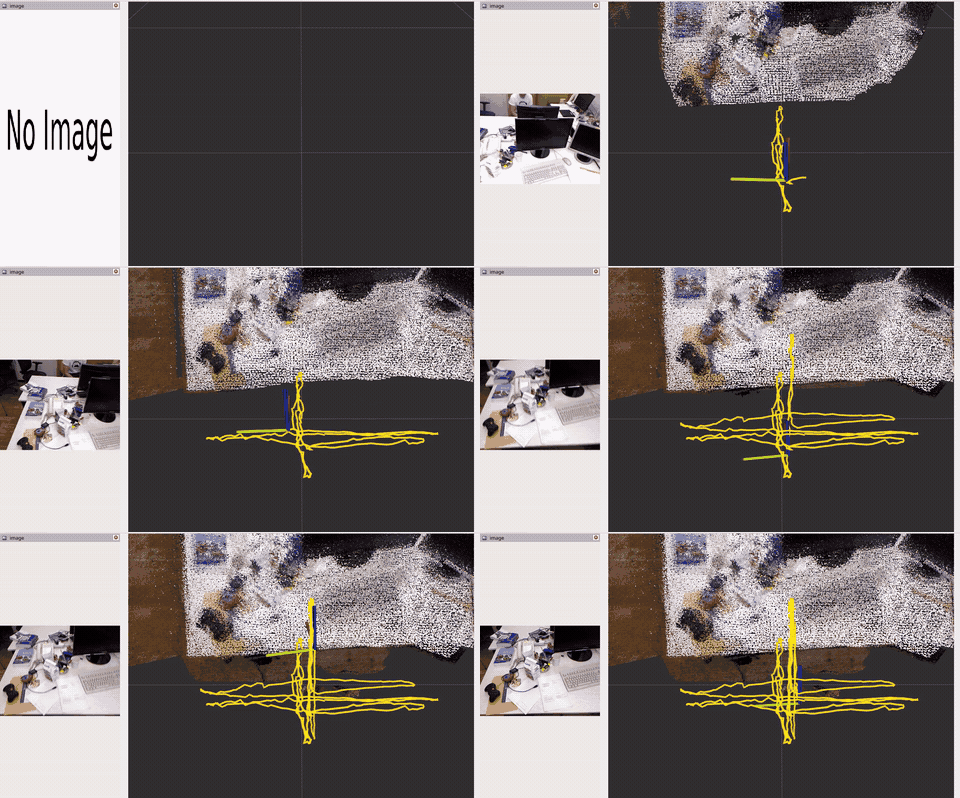
The input is 30 RGB-D images of the TUM RGB-D freiburg1_xyz sequence (image, depth in mm and camera_info, by test/publish_rgbd.py, with the static TF of the camera on camera_link), in a loop (the odometry restarts when the time goes back); the demo above is of the whole sequence below. rviz/rgbd_odometry.rviz shows the colored 3D map (~/map), the trajectory (~/path), the pose (~/odom) and the image; for your camera, give its frame on the robot, e.g. base_frame:=base_link.
See Credits of the demo videos for the license of the video.
3D and 2D maps
The visual odometry of an RGB-D camera gives the 3D trajectory and the colored 3D map (~/map), and the odometry for slam_toolbox and Nav2. The commands below are in their own terminals.
3D map of TUM RGB-D (default)
wget https://cvg.cit.tum.de/rgbd/dataset/freiburg1/rgbd_dataset_freiburg1_xyz.tgz && tar xf rgbd_dataset_freiburg1_xyz.tgz
wget https://raw.githubusercontent.com/ros-perception/opencv_apps/indigo/tools/publish_tum_rgbd.py
python3 publish_tum_rgbd.py rgbd_dataset_freiburg1_xyz &
ros2 run rviz2 rviz2 -d $(ros2 pkg prefix --share opencv_apps)/rviz/rgbd_odometry.rviz &
ros2 launch opencv_apps rgbd_odometry.launch.xml image:=image depth:=depth camera_info:=camera_info base_frame:=base_link map_voxel_size:=0.01
The handheld camera of freiburg1_xyz (CC BY 4.0), by tools/publish_tum_rgbd.py; the ATE to its ground truth is 4.9 cm in 8 m (rgbd_icp). The odometry of a camera drifts more than of a LiDAR, e.g. 3.5 m in 41 m of freiburg2_pioneer_slam of a robot in a large hall (icp).
3D map and Nav2 with a depth camera in the simulation
sudo apt install ros-$ROS_DISTRO-nav2-bringup ros-$ROS_DISTRO-nav2-minimal-tb3-sim ros-$ROS_DISTRO-slam-toolbox
ros2 run rviz2 rviz2 -d $(ros2 pkg prefix --share opencv_apps)/rviz/odometry_tb3_simulation_3d.rviz &
ros2 launch opencv_apps odometry_tb3_simulation.launch.py odometry:=camera
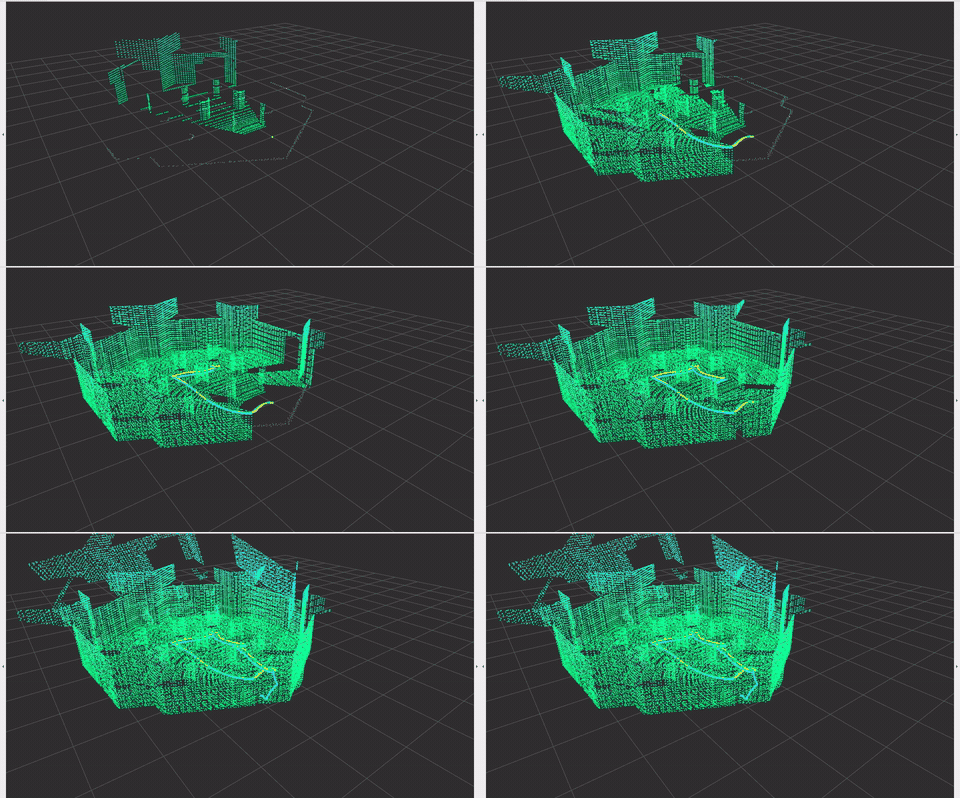
launch/odometry_tb3_simulation.launch.py: the depth camera of TurtleBot3 Waffle in Gazebo (no image, use_image:=false and method:=icp) gives the 3D map, and with odometry:=camera, odom -> base_footprint for slam_toolbox and Nav2 (the 2D map of the 2D LiDAR corrects the drift of the odometry, 0.6 m in a few meters in the world of few features).
Subscribed topics
Topic |
Type |
|---|---|
|
|
|
|
|
|
Published topics
Topic |
Type |
|---|---|
|
|
|
|
|
|
|
|
Parameters
See also the common parameters.
Name |
Type |
Default (range) |
Changed at run time |
Description |
|---|---|---|---|---|
|
string |
“” |
no, restart the node |
Frame of the robot, whose TF to the sensor is given (e.g. base_link, base_footprint), or empty for the frame of the sensor |
|
double |
0.1 (0 - 3.2) |
yes |
The images are registered to the keyframe until the camera turns this angle (rad) from it. |
|
double |
0.1 (0 - 10) |
yes |
The images are registered to the keyframe until the camera moves this distance (m) from it. |
|
double |
1.0 (0 - 3600) |
no, restart the node |
Period (s) to publish the 3D map (~/map). |
|
double |
0.05 (0 - 10) |
no, restart the node |
Size (m) of the voxels of the 3D map (~/map, a point of each voxel), 0 for no map. |
|
double |
4.0 (0 - 1000) |
yes |
Maximum valid depth (m). |
|
double |
0.07 (0 - 10) |
yes |
Maximum difference (m) of the depths of the corresponding points of the images. |
|
string |
“rgbd_icp” |
yes |
Method of the odometry: rgbd (the photometric error of the image, cv::rgbd::RgbdOdometry), icp (the geometric error of the depth, cv::rgbd::ICPOdometry) or rgbd_icp (both, cv::rgbd::RgbdICPOdometry) |
|
double |
0.3 (0 - 100) |
yes |
Minimum valid depth (m). |
|
string |
“odom” |
no, restart the node |
Frame of the odometry, the robot (base_frame) at the start |
|
int |
10000 (0 - 1e+06) |
no, restart the node |
Number of the poses of ~/path, the trajectory for rviz, 0 for all of them. |
|
bool |
true |
no, restart the node |
Publish the TF odom_frame -> base_frame; with it at the start, the node subscribes the inputs always, for the subscribers of /tf. |
|
int |
10 |
no, restart the node |
Queue size of the synchronized subscribers. |
|
bool |
true |
no, restart the node |
Subscribe the image; false for a depth camera without the image, of method icp |
Source
src/nodelet/rgbd_odometry_nodelet.cpp, launch/rgbd_odometry.launch.xml