equalize_histogram
Equalizes the histogram of the image (cv::equalizeHist() or CLAHE) to improve its contrast.
opencv_apps |
2.0.3 and later (ROS 1), 3.0.0 and later (ROS 2) |
|---|---|
ROS |
ROS One, jazzy, kilted, lyrical and later |
OpenCV |
any version of the distributions |
Group |
Image filters, the nodes of which publish the processed image in |
Usage
# ROS 2
ros2 launch opencv_apps equalize_histogram.launch.xml image:=/camera/image_raw debug_view:=false
# ROS 1
roslaunch opencv_apps equalize_histogram.launch image:=/camera/image_raw debug_view:=false
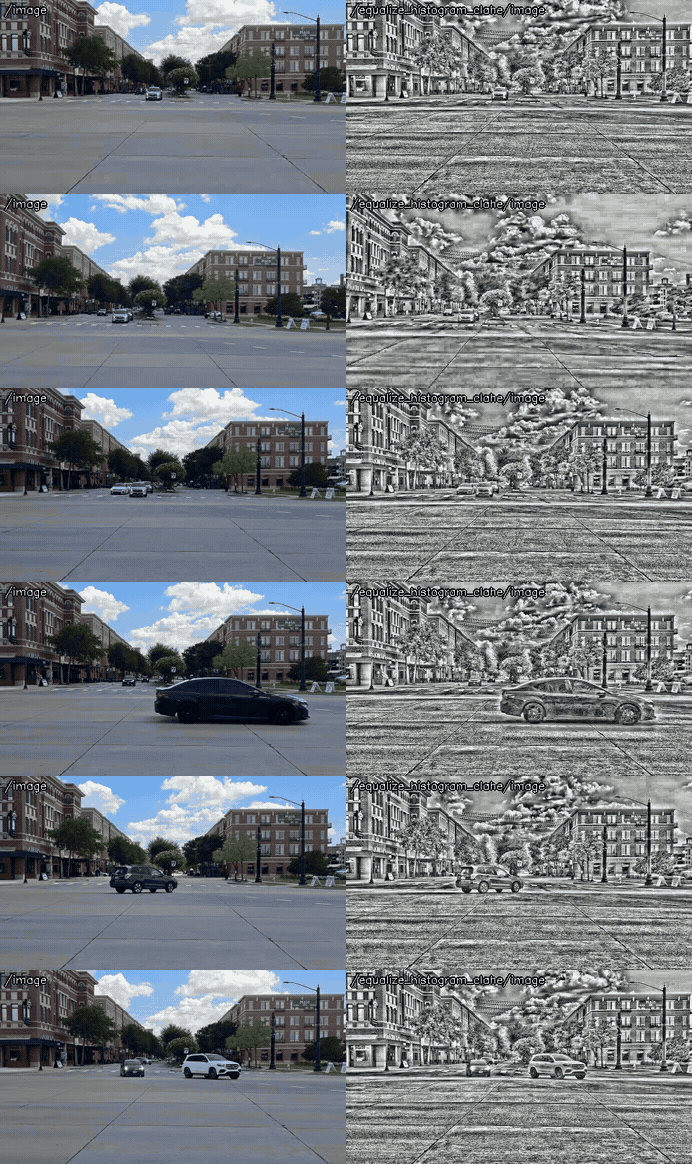
Try it with the demo video
Download the input video of the demo above, publish it as image with image_publisher, and run the node on it, in the terminals:
wget https://ros-perception.github.io/opencv_apps/media/clips/street.mp4
# terminal 1: publish the video as image in a loop
ros2 run image_publisher image_publisher_node street.mp4 --ros-args -p publish_rate:=10.0 -r image_raw:=image
# terminal 2: run the node with the parameters of the demo
ros2 launch opencv_apps equalize_histogram.launch.xml image:=image clahe_clip_limit:=20.0 clahe_tile_size_x:=32 clahe_tile_size_y:=32 histogram_equalization_type:=1 node_name:=equalize_histogram_clahe use_opencl:=false
# terminal 3: view the result
ros2 run rqt_image_view rqt_image_view /equalize_histogram_clahe/image
CLAHE.
In ROS 1:
# terminal 1
rosrun image_publisher image_publisher street.mp4 _publish_rate:=10 __name:=camera
# terminal 2
roslaunch opencv_apps equalize_histogram.launch image:=camera/image_raw clahe_clip_limit:=20.0 clahe_tile_size_x:=32 clahe_tile_size_y:=32 histogram_equalization_type:=1 node_name:=equalize_histogram_clahe use_opencl:=false
See Credits of the demo videos for the license of the video.
Subscribed topics
Topic |
Type |
|---|---|
|
|
Published topics
Topic |
Type |
|---|---|
|
|
Parameters
See also the common parameters.
Name |
Type |
Default (range) |
Changed at run time |
Description |
|---|---|---|---|---|
|
double |
20.0 (0 - 255) |
yes |
Clip Limit for Clahe filter |
|
int |
32 (0 - 300) |
yes |
X Tile Size for Clahe filter |
|
int |
32 (0 - 300) |
yes |
Y Tile Size for Clahe filter |
|
int |
0 (0 - 1) |
yes |
Histogram Equalization Methods, 0: EqualizeHist, 1: Clahe |
|
int |
3 |
no, restart the node |
Specigy queue_size of input image subscribers |
|
bool |
true |
no, restart the node |
Enable or disable OpenCL |
Source
src/nodelet/equalize_histogram_nodelet.cpp, launch/equalize_histogram.launch.xml