dnn_inpainting
Fill the masked region of the image with LaMa (OpenCV 5.0 or later).
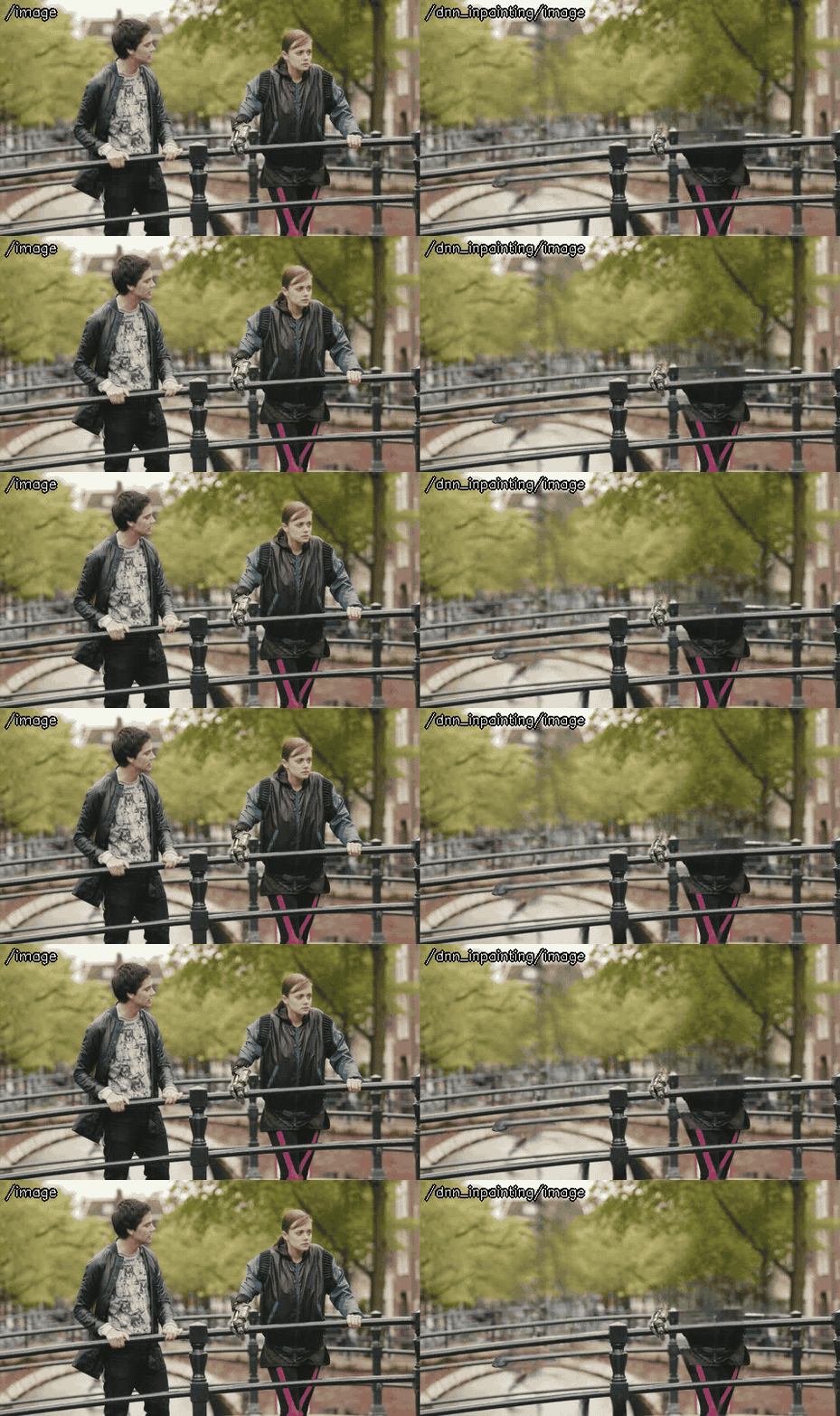
Inpainting, fills the masked region of the image with LaMa of opencv_zoo, which needs OpenCV 5.0 or later. The region is the rectangle given by ~set_roi service (opencv_apps/SetROI as the tracking nodes, e.g. by scripts/set_image.py, an empty rectangle clears it) and the non-zero pixels of the latest image on mask (mono8, e.g. ~/label of dnn_semantic_segmentation to remove the people). The image is resized to 512x512 for the model, and only the masked region of the result is pasted back on the input image, which is published as it is when no region is given.
opencv_apps |
3.1.0 and later |
|---|---|
ROS |
any, with OpenCV built from source; not ROS One (OpenCV 4.6), jazzy (OpenCV 4.6), kilted (OpenCV 4.6), lyrical (OpenCV 4.10) |
OpenCV |
OpenCV 5.0 or later, which reads LaMa (OpenCV 4.6 - 4.12 fail to read it) |
Group |
Image filters, the nodes of which publish the processed image in |
Usage
# ROS 2
ros2 launch opencv_apps dnn_inpainting.launch.xml image:=/camera/image_raw debug_view:=false
# ROS 1
roslaunch opencv_apps dnn_inpainting.launch image:=/camera/image_raw debug_view:=false
Try it with the demo video
Download the input video of the demo above, publish it as image with image_publisher, and run the node on it, in the terminals:
wget https://ros-perception.github.io/opencv_apps/media/clips/tos_bridge.mp4
# terminal 1: publish the video as image in a loop
ros2 run image_publisher image_publisher_node tos_bridge.mp4 --ros-args -p publish_rate:=10.0 -r image_raw:=image
# terminal 2: run the node with the parameters of the demo
ros2 launch opencv_apps dnn_inpainting.launch.xml image:=image mask:=/dnn_semantic_segmentation/label
# terminal 3: run, keep it running
ros2 launch opencv_apps dnn_semantic_segmentation.launch.xml image:=image debug_view:=false
# terminal 4: view the result
ros2 run rqt_image_view rqt_image_view /dnn_inpainting/image
The people found by dnn_semantic_segmentation (its ~/label, non-zero for the people) are filled by LaMa (Apache-2.0) of opencv_zoo, which needs OpenCV 5.0 or later and takes about 0.8 s for each image on a CPU (OpenCV 5.1). A rectangle is filled with ros2 run opencv_apps set_image.py <center x> <center y> <width> <height> --ros-args -r set_roi:=/dnn_inpainting/set_roi instead, and cleared with the width and height of 0.
See Credits of the demo videos for the license of the video.
Subscribed topics
Topic |
Type |
|---|---|
|
|
|
|
Published topics
Topic |
Type |
|---|---|
|
|
Services
Service |
Type |
|---|---|
|
|
Parameters
See also the common parameters.
Name |
Type |
Default (range) |
Changed at run time |
Description |
|---|---|---|---|---|
|
string |
“cpu” |
yes |
Backend of cv::dnn: auto, cpu, opencl, opencl_fp16, cuda or cuda_fp16. auto uses CUDA when OpenCV is built with CUDA and a CUDA device is found, and the CPU otherwise. cpu by default, as OpenCV 5.1 runs LaMa on the CPU also with cuda, which is slower |
|
int |
10 |
yes |
Pixels to dilate the region to fill by, as the masks of segmentation (e.g. ~/label of dnn_semantic_segmentation) miss the edges of the objects, which LaMa extends otherwise |
|
string |
“” |
yes |
Path or URL of the model (onnx) of the same input and output as LaMa, empty for LaMa of opencv_zoo. The URL is downloaded to ~/.ros/opencv_apps/models/ at the first time |
|
int |
3 |
no, restart the node |
Specify queue_size of input image subscribers |
Source
src/nodelet/dnn_inpainting_nodelet.cpp, launch/dnn_inpainting.launch.xml