dnn_super_resolution
Super resolution of the image with a DNN model, e.g. ESPCN of dnn_superres.
Super resolution of the image, by default with ESPCN x2, or with FSRCNN x2 or x3, the onnx models of dnn_superres of opencv_contrib (in opencv_extra), converted from the TensorFlow models of TF-ESPCN and FSRCNN_Tensorflow (Apache-2.0). As dnn_superres, the model enlarges the Y channel of YCrCb (0 - 1), and the Cr and Cb channels are enlarged by the bicubic interpolation. The scale (the size of ~image / the size of the input) is that of the model. The models need OpenCV 4.12 or later (OpenCV 4.6 cannot read them, and 4.10 fails on them).
opencv_apps |
3.1.0 and later |
|---|---|
ROS |
any, with OpenCV built from source; not ROS One (OpenCV 4.6), jazzy (OpenCV 4.6), kilted (OpenCV 4.6), lyrical (OpenCV 4.10); not on lyrical, whose OpenCV 4.10 fails on the models |
OpenCV |
OpenCV 4.12 or later, which runs the onnx models of dnn_superres (4.10 fails on DepthToSpace) |
Group |
Image filters, the nodes of which publish the processed image in |
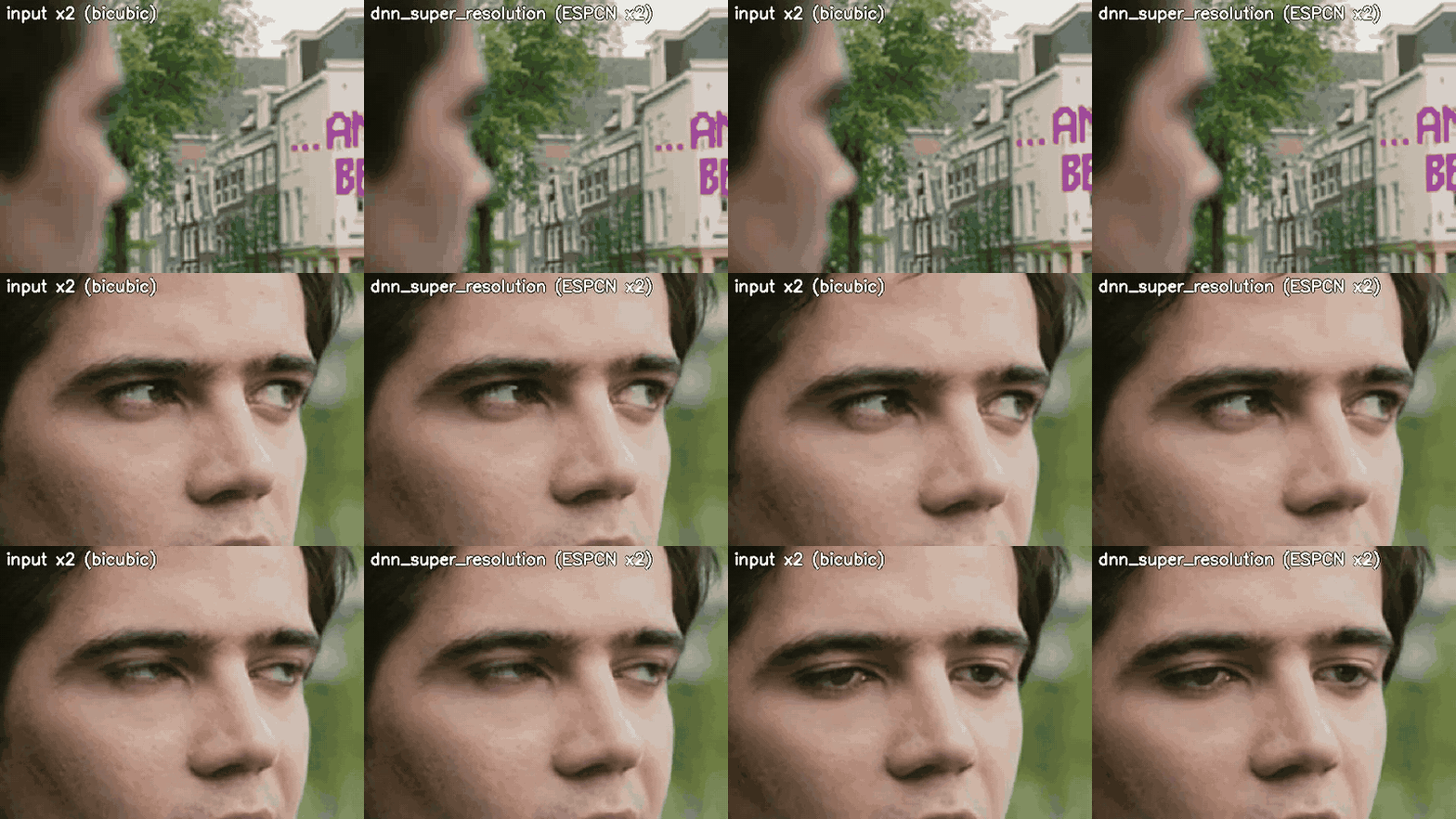
Usage
# ROS 2
ros2 launch opencv_apps dnn_super_resolution.launch.xml image:=/camera/image_raw debug_view:=false
# ROS 1
roslaunch opencv_apps dnn_super_resolution.launch image:=/camera/image_raw debug_view:=false
Try it with the demo video
Download the input video of the demo above, publish it as image with image_publisher, and run the node on it, in the terminals:
wget https://raw.githubusercontent.com/ros-perception/opencv_apps/indigo/test/face_detector_withface_test_diamondback.mp4
# terminal 1: publish the video as image in a loop
ros2 run image_publisher image_publisher_node face_detector_withface_test_diamondback.mp4 --ros-args -p publish_rate:=10.0 -r image_raw:=image
# terminal 2: run the node
ros2 launch opencv_apps dnn_super_resolution.launch.xml image:=image
# terminal 3: view the result
ros2 run rqt_image_view rqt_image_view /dnn_super_resolution/image
In ROS 1:
# terminal 1
rosrun image_publisher image_publisher face_detector_withface_test_diamondback.mp4 _publish_rate:=10 __name:=camera
# terminal 2
roslaunch opencv_apps dnn_super_resolution.launch image:=camera/image_raw
See Credits of the demo videos for the license of the video.
Models
The node runs the onnx models of dnn_superres of opencv_contrib (in opencv_extra, OpenCV 4.10 or later), given by model, whose scale is the scale of ~/image; the model enlarges the Y channel of YCrCb, and the colors (Cr and Cb) are enlarged by the bicubic interpolation. The models are converted from the TensorFlow models of TF-ESPCN and FSRCNN_Tensorflow, both Apache-2.0 (opencv_extra, which has the onnx files, has no license file of its own). The input of this demo is 640x480.
ESPCN x2 (default)
ros2 launch opencv_apps dnn_super_resolution.launch.xml image:=image
ESPCN x2 (86 KB): 2 times as large, e.g. 640x480 to 1280x960, the fastest.
FSRCNN x2

ros2 launch opencv_apps dnn_super_resolution.launch.xml image:=image model:=https://raw.githubusercontent.com/opencv/opencv_extra/697e5c3de828f3154e82f222dbe902d622bbe19a/testdata/cv/dnn_superres/FSRCNN_x2.onnx
FSRCNN x2 (38 KB): 2 times as large, about as accurate as ESPCN x2 (the benchmark of dnn_superres) and slower.
FSRCNN x3

ros2 launch opencv_apps dnn_super_resolution.launch.xml image:=image model:=https://raw.githubusercontent.com/opencv/opencv_extra/697e5c3de828f3154e82f222dbe902d622bbe19a/testdata/cv/dnn_superres/FSRCNN_x3.onnx
FSRCNN x3 (39 KB): 3 times as large, e.g. 640x480 to 1920x1440.
Subscribed topics
Topic |
Type |
|---|---|
|
|
Published topics
Topic |
Type |
|---|---|
|
|
Parameters
See also the common parameters.
Name |
Type |
Default (range) |
Changed at run time |
Description |
|---|---|---|---|---|
|
string |
“auto” |
yes |
Backend of cv::dnn: auto, cpu, opencl, opencl_fp16, cuda or cuda_fp16. auto uses CUDA when OpenCV is built with CUDA and a CUDA device is found, and the CPU otherwise. |
|
string |
“” |
yes |
Path or URL of the model (onnx) of dnn_superres, ESPCN or FSRCNN, whose scale is the scale of ~image, empty for ESPCN x2. The URL is downloaded to ~/.ros/opencv_apps/models/ at the first time |
|
int |
3 |
no, restart the node |
Specify queue_size of input image subscribers |
Source
src/nodelet/dnn_super_resolution_nodelet.cpp, launch/dnn_super_resolution.launch.xml